If you spend long hours working at a desk, choosing the right mouse can make a bigger difference than you might expect.The Logitech MX Master 3S is often recommended as a premium mouse for office work and everyday productivity—but it also comes with a higher price than most standard mice.
So the real question is: is the Logitech MX Master 3S actually worth buying for everyday use?
This review breaks down how it performs in real-world situations, who it’s best suited for, and where it may fall short.
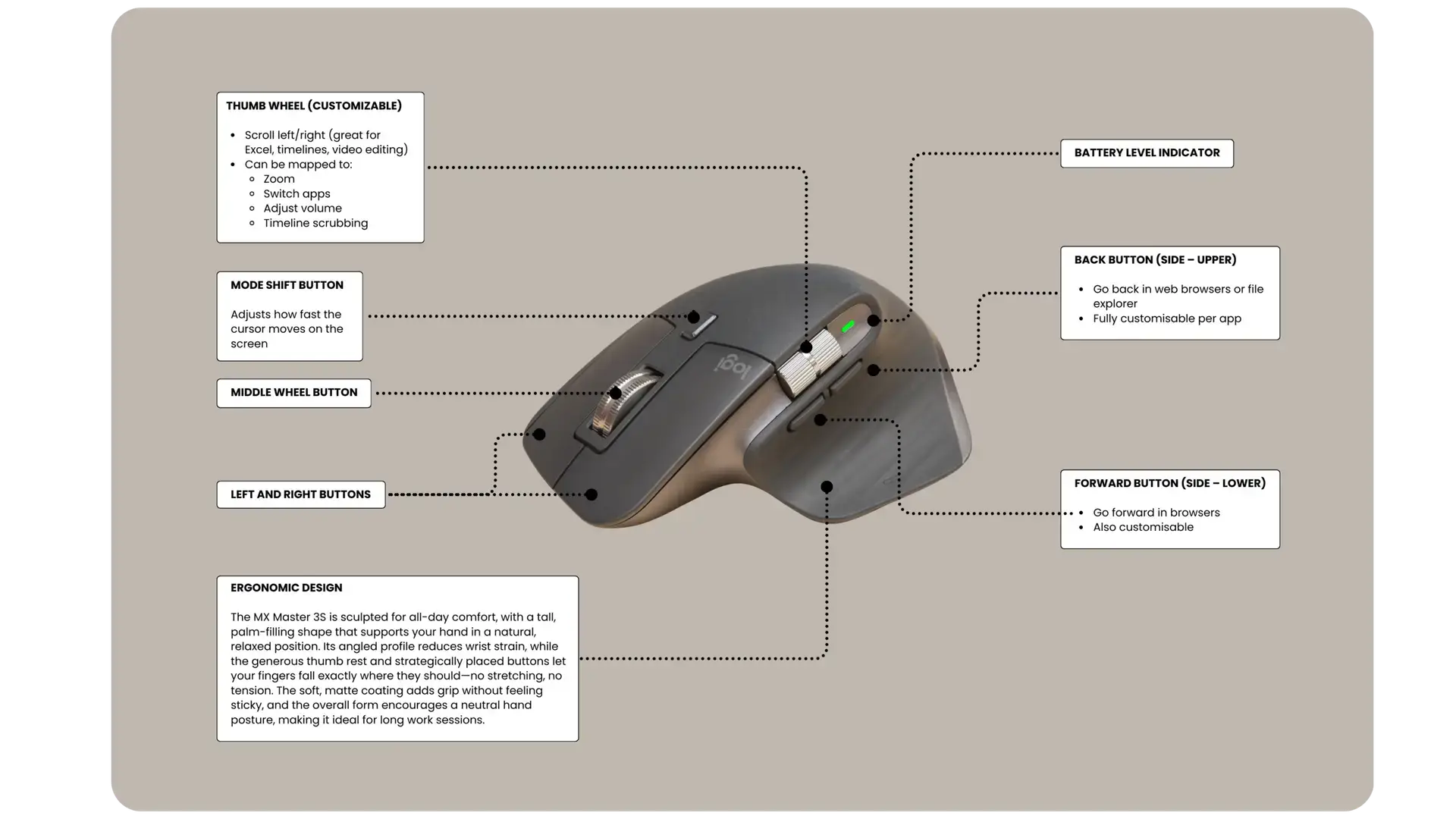
In everyday use, one of the biggest strengths of the Logitech MX Master 3S is comfort.
For example, its ergonomic shape supports your hand naturally, which helps during long workdays.
For office workers, students, and remote employees, Over time, this can help reduce wrist strain and hand fatigue. If you regularly work with documents, spreadsheets, emails, or design tools, the MX Master 3S feels noticeably more comfortable than cheaper, flat mice.
For example, the MX Master 3S features quiet clicks, which makes it suitable for shared offices or home workspaces. The buttons feel responsive without being loud or distracting.
Its standout feature is the scroll wheel. Scrolling through long documents, PDFs, and web pages feels smooth and precise, which is especially useful for productivity-focused tasks. This alone makes a noticeable difference in daily workflow efficiency.
That said, while the MX Master 3S is not designed as a gaming mouse, it can still handle casual gaming well. Tracking is accurate and consistent, making it suitable for strategy games, RPGs, and general PC gaming after work.
However, competitive gamers who prefer lightweight mice or fast-paced FPS gameplay may find it less suitable due to its heavier build and productivity-first design.
Even though it’s a premium mouse, the Logitech MX Master 3S is easy to use straight out of the box. You don’t need to customise settings or remap buttons unless you want to.
This makes it a good option for users who want a reliable, comfortable mouse without dealing with complicated software or steep learning curves.
This mouse is ideal if you:
Work long hours at a desk
Want an ergonomic mouse for office productivity
Prefer quiet clicks and smooth scrolling
Value comfort over flashy features
It may not be the best choice if you:
Primarily play competitive games
Prefer lightweight or ambidextrous mice
Are looking for a budget mouse
Overall, the Logitech MX Master 3S is a premium productivity mouse built for comfort and reliability and everyday office use. It’s not designed to replace a dedicated gaming mouse, but for professionals and casual users who spend hours at a desk, it delivers a noticeable improvement in comfort and workflow.
If your priority is ergonomic design, smooth scrolling, and a frustration-free experience, the MX Master 3S is a strong contender worth considering.
We tested this across different conditions and scenarios. Here’s what matters about this gadget.
Runs for days on a single charge without compromise.
Intuitive controls that don’t require reading the manual.
Consistent speed and stability through extended daily use.
Materials feel solid and design is built to last.
Find the best price and grab it today through our trusted Amazon link.